Fine-Tuning the Base Models in Generative AI
Create custom models in OCI Generative AI by fine-tuning the base models with your own dataset. You can create new custom models or create new versions of existing custom models.
If you want to use a model that was already fine-tuned outside the service, you can import a compatible model from Hugging Face or an Object Storage bucket. OCI Generative AI doesn't fine-tune imported models. See Importing Fine-Tuned Models for preparation and validation guidance and Compatible Models for Import for the supported model list.
The following workflow displays the tasks for fine-tuning a pretrained model and hosting the fine-tuned model.
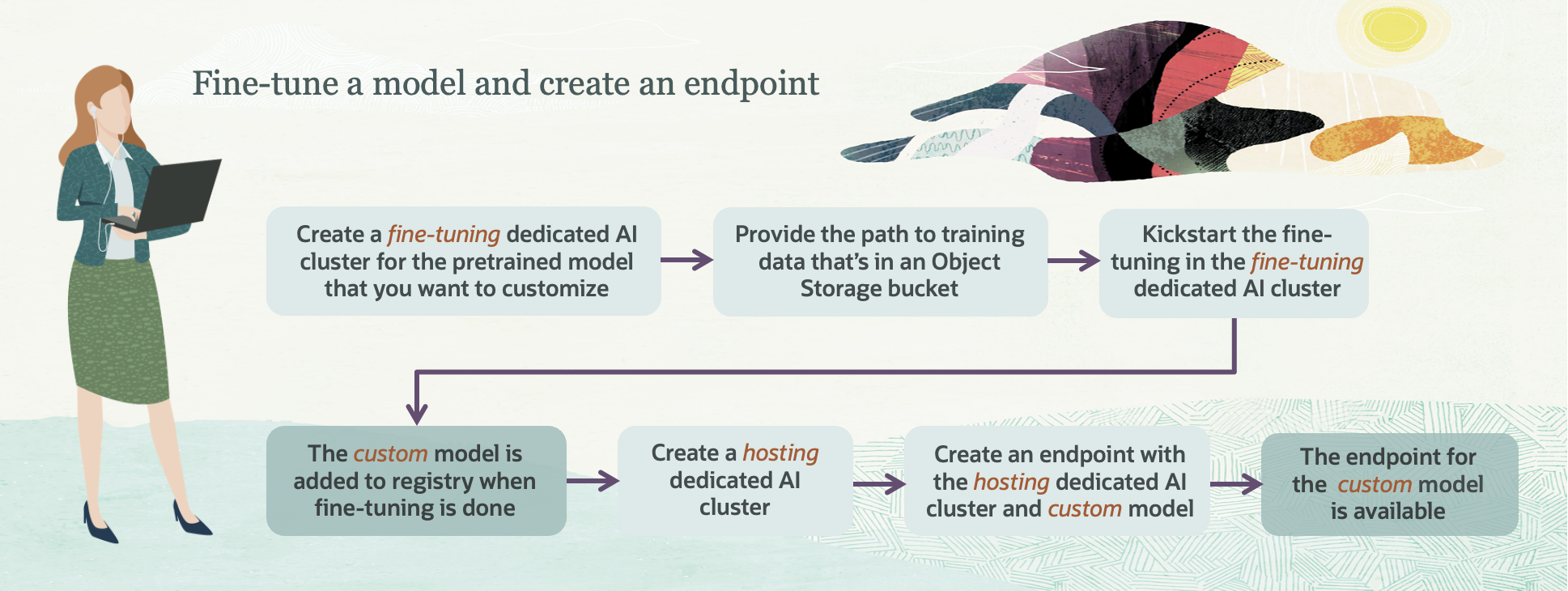
The following tasks provide the steps for fine-tuning a pretrained model and hosting the fine-tuned model:
- Create the training dataset.
- Add the dataset to an Object Storage bucket.
- Create a fine-tuning dedicated AI cluster.
- Create a new custom model or create a new version from an existing model on the fine-tuning dedicated AI cluster.
- Create a hosting dedicated AI cluster.
- Create an endpoint for the custom model on the hosting dedicated AI cluster.
- Run the custom model in the playground.
Managing Custom Models
In OCI Generative AI, you create custom models by fine-tuning the base models with your own datasets. You can create custom models or create new versions of existing custom models.